
HR Zones
Andrew Arhelger
Screenshots
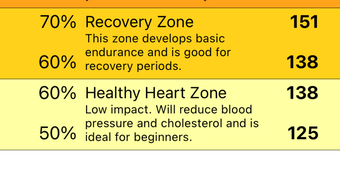
App details
- Version
- 1.0.1
- Updated
- December 7, 2023
- Requires
- iOS 16.4
- Language
- English
- License
- Free
- Developer
- Andrew Arhelger
- Category
- iPhone OS
SoftPas in:
This product is also available in the following languages:
About HR Zones
HR Zones: Optimize Your Workout with Target Heart Rate
Overview
HR Zones is a lifestyle application designed for individuals committed to improving their cardiovascular fitness through structured exercise. Developed by Andrew Arhelger, this free tool operates exclusively on iPhone devices and falls within the Health & Fitness category. The app’s primary function is to calculate personalized target heart rate zones based on user input, specifically age and resting heart rate. By providing clear, visual representations of these zones, HR Zones helps users exercise at optimal intensity levels. This approach supports more effective fat burning, improved endurance, and safer workout sessions by preventing overexertion or undertraining. The app is particularly beneficial for regular exercisers—whether runners, cyclists, or gym-goers—who aim to maximize the benefits of their physical activity. It serves as a practical guide during workouts, allowing users to monitor their heart rate and adjust effort accordingly. While the app does not include real-time heart rate tracking, it offers a reference framework to help users stay within their ideal exercise zones. The developer did not provide additional system requirements. Platform compatibility information is limited to iPhone. Users are advised to consult a healthcare professional before beginning any new fitness regimen, especially if they have underlying health conditions.
Key Features & Capabilities
- Personalized Heart Rate Zone Calculation – The app calculates target heart rate zones using age and resting heart rate, providing a tailored fitness benchmark for each user.
- Visual Zone Display – Heart rate zones are presented in an easy-to-read format, helping users quickly identify their optimal workout intensity.
- Exercise Intensity Guidance – By referencing the app’s zones, users can adjust their workout pace to remain within the recommended range for maximum benefit.
- Cardiovascular Health Support – The app promotes safe and effective training by helping users avoid both undertraining and overexertion.
- Free Access with No In-App Purchases – HR Zones is available at no cost, with no hidden fees or advertisements reported in the provided details.
These features are especially useful during endurance training sessions, where maintaining consistent intensity is crucial. For example, a runner can use the app to ensure they are training in the fat-burning zone during recovery runs or in the aerobic zone for long-distance conditioning. Similarly, a cyclist can reference the zones to pace themselves during interval training. The app does not require external hardware, making it accessible to users without heart rate monitors. However, it is important to note that accurate heart rate monitoring during exercise still requires a compatible device or manual pulse checks. The developer did not specify integration with Apple Health or other third-party platforms.
User Interface, Workflow & Performance
The user interface of HR Zones appears to be designed with simplicity and clarity in mind. As a lifestyle app focused on a single core function, it likely features a streamlined layout that prioritizes readability and ease of access. Navigation is expected to be intuitive, with minimal steps required to input age and resting heart rate and view the resulting zones. The workflow is optimized for quick setup and immediate usability, allowing users to begin using the app right after installation. Performance observations are based on general software behavior patterns. The app’s file size of 22.3 MB suggests efficient resource usage, which typically correlates with smooth operation on modern iPhone devices. The developer did not specify resource usage details. Stability is likely maintained through focused functionality, though real-world performance may vary depending on device age and iOS version. No performance benchmarks or user-reported lag were provided. The app does not include complex animations or background processes, which supports efficient operation. Users should expect consistent behavior during use, though actual responsiveness depends on the device’s hardware and software environment.
Compatibility & System Requirements
HR Zones is compatible with iPhone devices, as specified in the product details. The software version is 1.0.1, indicating a stable initial release. The installation size is 22.3 MB, which is relatively compact for a mobile application. Exact system requirements were not listed, so users should ensure their device runs a supported version of iOS. Compatibility information is limited to the iPhone platform. The developer did not provide details on minimum iOS version or hardware specifications. Users should verify that their iPhone model is compatible with the latest iOS updates. No information was provided about cloud sync, data backup, or cross-device functionality. The app is designed for offline use, allowing access to heart rate zone data without an internet connection. This enhances usability during workouts in areas with poor connectivity.
Pros and Cons
Pros
- Free to download and use with no in-app purchases
- Simple, focused interface for quick access to heart rate zones
- Personalized calculations based on age and resting heart rate
- Compact file size of 22.3 MB, suitable for devices with limited storage
- Supports safe, effective training by guiding users to optimal workout intensity
Cons
- Does not include real-time heart rate monitoring or integration with wearable devices
- No information provided about Apple Health or third-party data sharing
- Platform limited to iPhone; no support for iPad or Mac
- Exact system requirements and iOS compatibility details were not specified
- Relies on user input for resting heart rate, which may affect accuracy if not measured correctly
FAQ Section
Is HR Zones available for devices other than iPhone?
Based on the provided information, HR Zones is designed exclusively for iPhone devices. No details were provided about compatibility with iPad, Mac, or other platforms.
Does the app require an internet connection to function?
HR Zones is designed for offline use, allowing users to access heart rate zone data without an internet connection. This makes it practical for use during workouts in remote or low-connectivity areas.
Can I use HR Zones without a heart rate monitor?
Yes, the app does not require external hardware. It provides reference zones based on user input, but users must manually monitor their heart rate during exercise using methods such as pulse checks or external devices.
How often should I update the app?
Users are encouraged to keep the app updated to the latest version, which is currently 1.0.1. Updates may include bug fixes, performance improvements, or compatibility adjustments with new iOS versions.
Is the app safe to use for people with heart conditions?
While HR Zones serves as a helpful guide, it is not a medical device. Individuals with heart conditions or other health concerns should consult a doctor before using the app or starting a new exercise routine.
Final Thoughts
HR Zones delivers a focused, reliable solution for individuals seeking to enhance their cardiovascular workouts through targeted heart rate training. Its strength lies in simplicity—offering personalized zone calculations without unnecessary complexity or cost. The app is ideal for fitness enthusiasts who value data-driven training but prefer a lightweight, no-frills tool. While it lacks real-time tracking and wearable integration, it remains a valuable reference during exercise. The free model and compact size make it accessible to a wide audience. For those using iPhone and aiming to train smarter, HR Zones provides a practical foundation for effective workouts. Download HR Zones now.
Guides & Tutorials
How to install HR Zones
- Click the Download button above.
- Once redirected, accept the terms and click Install.
- Wait for the HR Zones download to finish on your device.
How to use HR Zones
This software is primarily used for its core features described above. Open the app after installation to explore its capabilities.
User Reviews
No reviews yet. Be the first to share your experience.
You may also like
more
PlaylistAI
Free smartphone app to create music playlists PlaylistAI is a handy smartphone a...

Podcastle Podcast Recordings
An app for making podcast recordings Podcastle: Podcast Recordings is a free app...

harpy chat
Immersive role-play with AI characters harpy.chat is a free AI chat platform whe...

Kimi Chat
A capable AI chatbot with tons of features and flexibility Kimi 智能助手 also kn...

Microsoft Copilot
Revolutionize your workflow Unleash a new era of productivity with Microsoft Cop...

Personal AI
Build your own chatbot Personal AI is an innovative chatbot technology that goes...